IT asset discovery tools
- Devices found that the register does not know about
- 27
- Computed on this page from the inputs below
- Addresses scanned
- 762
- Computed on this page from the inputs below
- Share of the address space in use, percent
- 17
- Computed on this page from the inputs below
- Register devices that should have answered
- 104
- Computed on this page from the inputs below
Every figure on a worksheet comes from the inputs you enter and the method stated beside it: your cost, your salvage value, your useful life, your device counts and your scan results. Where a guide names a published rule, the document is cited with a path to the clause, and the figure is licensed in this repository's claims ledger before it appears on a page.
Email me this result
We will send you these figures and a link back to them. One email, nothing else unless you tick the box.
The figures start from a worked example (27), one line from a typical small-company register. Change any input and the line recomputes as you type.
Download the IT asset discovery tools worked example (CSV)
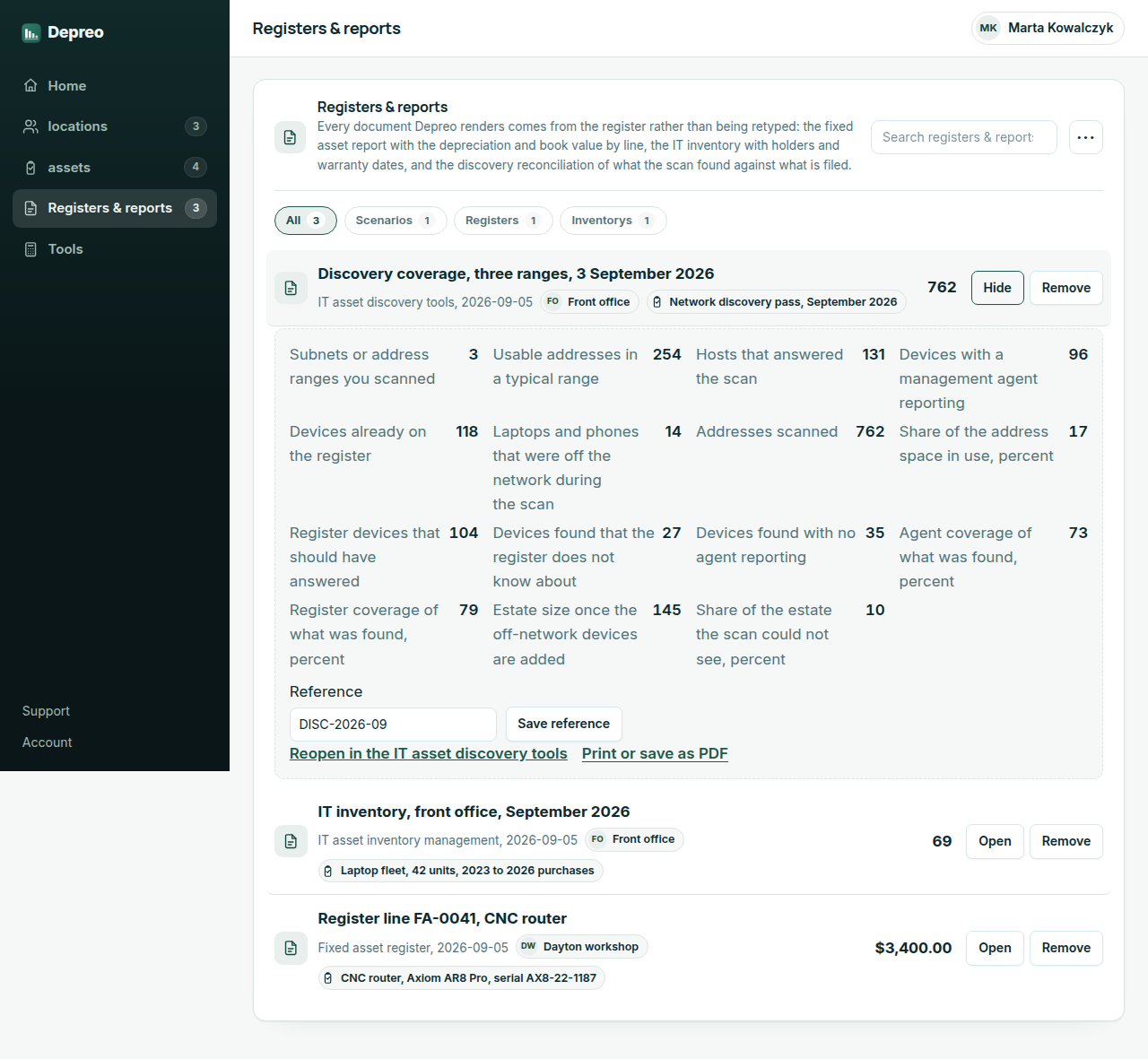
IT asset discovery tools find what is on the network; this worksheet says how much of the estate they found. It takes the subnets or address ranges you scanned and the usable addresses in each, the hosts that answered, the devices with a management agent reporting, the devices already on the register, and the laptops and phones that were off the network when the scan ran. It returns the addresses scanned, the share in use, the register devices that should have answered, the number of devices found that the register does not know about, the number found with no agent, the agent and register coverage of what was found, the estate size once the off-network devices are added, and the share of the estate the scan could not see. It is the reconciliation between the register and reality, in the register keeper's own numbers.
IT asset discovery tools: what register keepers ask
What is the difference between agent-based and agentless asset discovery? An agent is a small program installed on each device that reports in wherever the device is, so it finds the laptop at home and misses the printer nobody can install anything on. An agentless scan sweeps the address ranges and finds whatever answers, printers included, but only while it is on the network. Most small organizations need both, which is why the worksheet returns the two coverages separately.
A device answered the scan but is not on the register. What is it? Usually one of four things: a device somebody bought and never filed, a personal phone on the staff wireless, a device that belongs to a contractor or a vendor, or a device that was disposed of on paper and not in fact. The worksheet counts them; the register work is to identify each one and either file it, block it or close it.
How often should a discovery pass run? Federal agencies are directed by CISA to run automated discovery at least every 7 days. A small organization has no directive, but a pass before each monthly or quarterly close, with the unknown-device count from this worksheet recorded each time, is what shows whether the register is gaining on the network or losing to it.
Depreo Pro
Keeping the register instead of the spreadsheet
Upgrading turns a worked line into a register. The asset you priced on the worksheet is filed against your organization with its holder and location; the depreciation runs each period without anyone reopening a spreadsheet; a disposal is recorded with its date and proceeds; and the fixed asset report at year end is a print, not a project.
- Save a scan's coverage and compare it with the next one
- Put two scans side by side and see what the register gained
- Share a coverage result without our name on it
- Send a holder the list of what is issued to them from inside the register
- Not sold on this hub: a register keeper does not invoice from it
- Not sold on this hub: the fixed asset report exports to your accountant instead
$49per month, whole team
Start Depreo Pro Free for 14 days. No card needed. PricingThe first 14 days are free and no card is asked for. Add a card during the trial and the first charge is on the day it ends; do not, and your workspace becomes read-only with nothing deleted. Depreo Pro is $49 per month for your whole organization, billed monthly, and renews each month at that price until you cancel. The price and the renewal terms are shown again before checkout.